Skip to navigation

Inactive Subscriptions Section

An overview of the inactive-subscriptions.liquid file structure and its components

View as Markdown

This article contains information about the Inactive Subscriptions Section. The Inactive Subscriptions Section can be found in the inactive-subscriptions.liquid file. For an overview of all elements, take a look at Subscription Manager Components & Containers.


Overview

The Inactive Subscriptions Section can be divided into 2 parts:

Header

Products
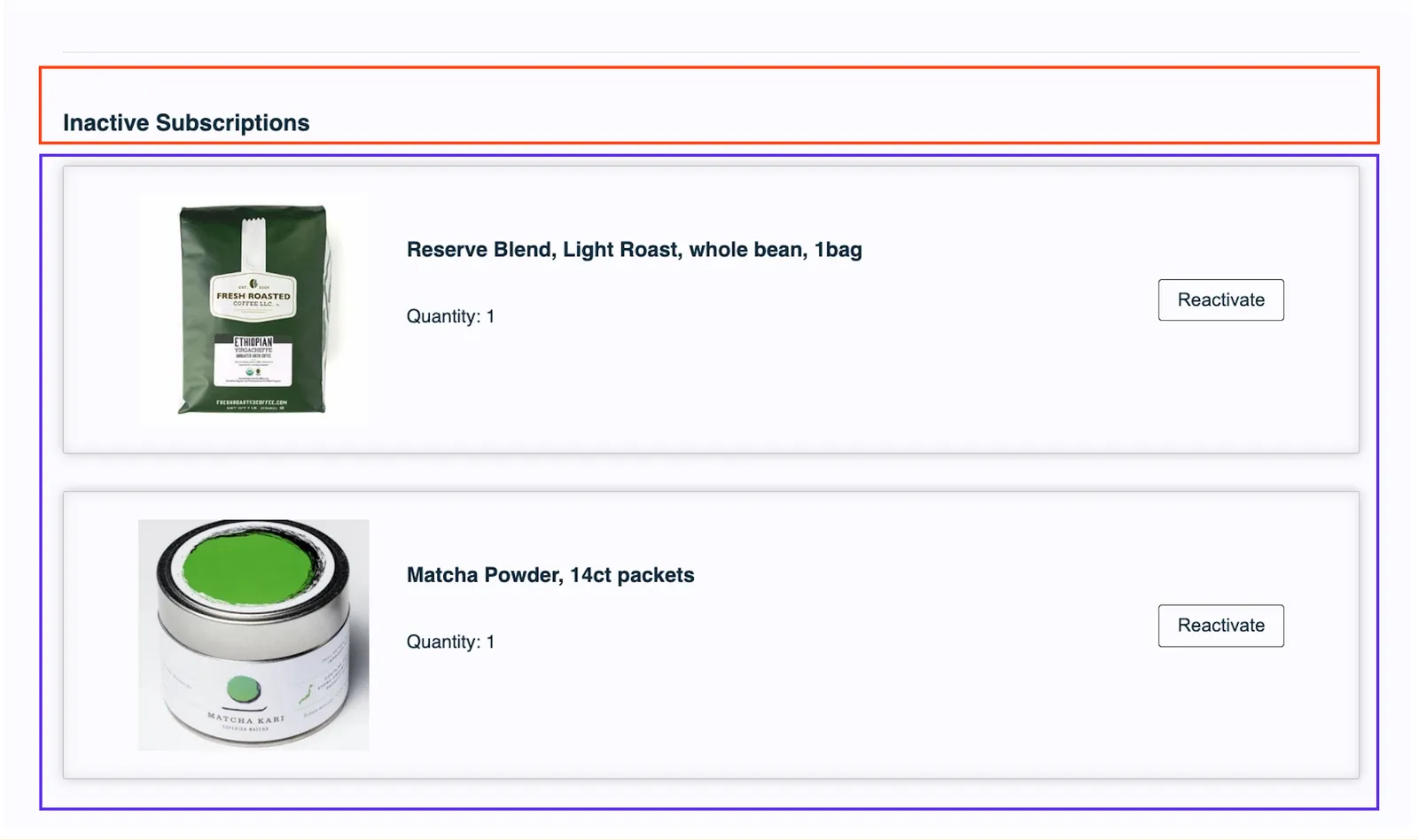
The Inactive Subscriptions section of the legacy (v0) Subscription Manager, split into two outlined parts. A red-orange outline marks the Header, which holds the Inactive Subscriptions heading. A purple outline marks the Products: two inactive subscriptions, Reserve Blend, Light Roast, whole bean, 1bag and Matcha Powder, 14ct packets, each with a product image, Quantity: 1 and a Reactivate button.
<section id="og-inactive-subscriptions">
{% for subscription in subscriptions | reject('live') %} {% if index === 0 %}
<h1 class="og-title">{{ 'subscriptions_inactive_header' | t }}</h1>
{% endif %}

Products

<div class="og-inactive-subscription">
{% set product = products | find(id=subscription.product) %} {% if product %}
<div class="og-product">...</div>{# /og-product #} {% endif %}
</div>
{# /og-inactive-subscription #} {% endfor %}
</section>{# /og-inactive-subscriptions #}

Individual Products

Each individual product is wrapped with:

<div class="og-product">
...
</div>{# /og-product #}

And each product is broken out to:

Product Image

Controls Container
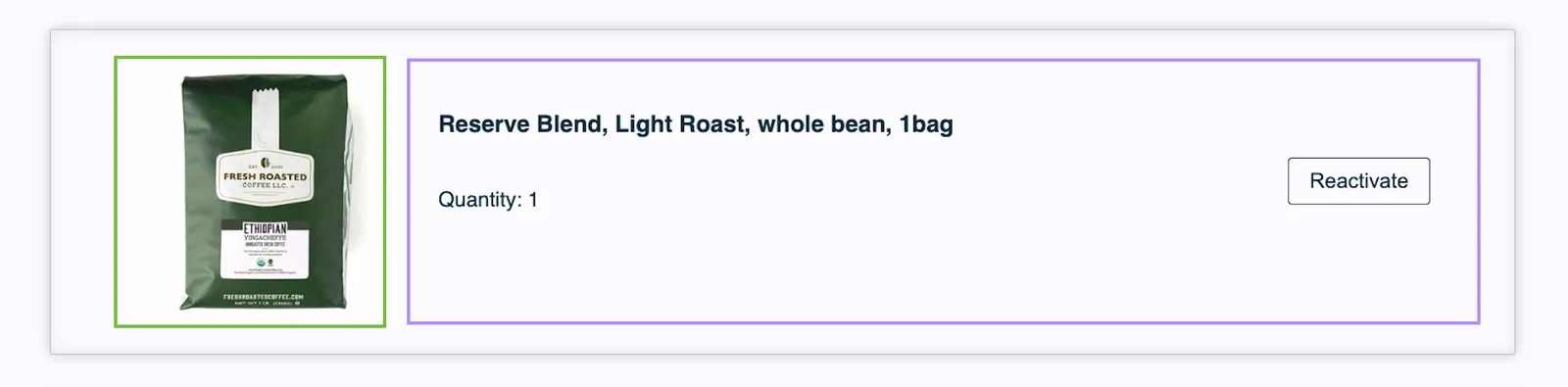
One inactive subscription's product card in the Subscription Manager, split into two outlined parts. A green outline marks the Product Image, the product photo. A light purple outline marks the Controls Container, which holds the product name, Reserve Blend, Light Roast, whole bean, 1bag, the text Quantity: 1 and a Reactivate button.

Product Image

<div class="og-product-image-container">
<img class="og-product-image" loading="lazy" alt="{{ product.name }}" src="{{ product.image_url | if_defined }}" />
</div>

Controls Container

<div class="og-name-price-controls-container">
<div class="og-description-and-controls">
<div class="og-product-description">
<h3 class="og-product-name"><a href="{{ product.detail_url | if_defined }}">{{ product.name }}</a>
</h3>
<div class="og-subscription-quantity">{{ 'product_read_only_quantity' | t }}</div>
</div>
</div>
<div class="og-inactive-subscription-actions">
{% include 'reactivate-subscription' %}
<div class="og-cancelled-text-date">
<span class="og-cancelled-text">{{ 'subscription_inactive_cancelled_on' | t }}</span>
<span class="og-cancelled-date">{{ subscription.cancelled | date }}</span>
</div>
</div>{# /og-inactive-subscription-actions #}

Within the Controls Container, the Description Controls are broken into 2 parts:

Product Description

Reactivate Subscription
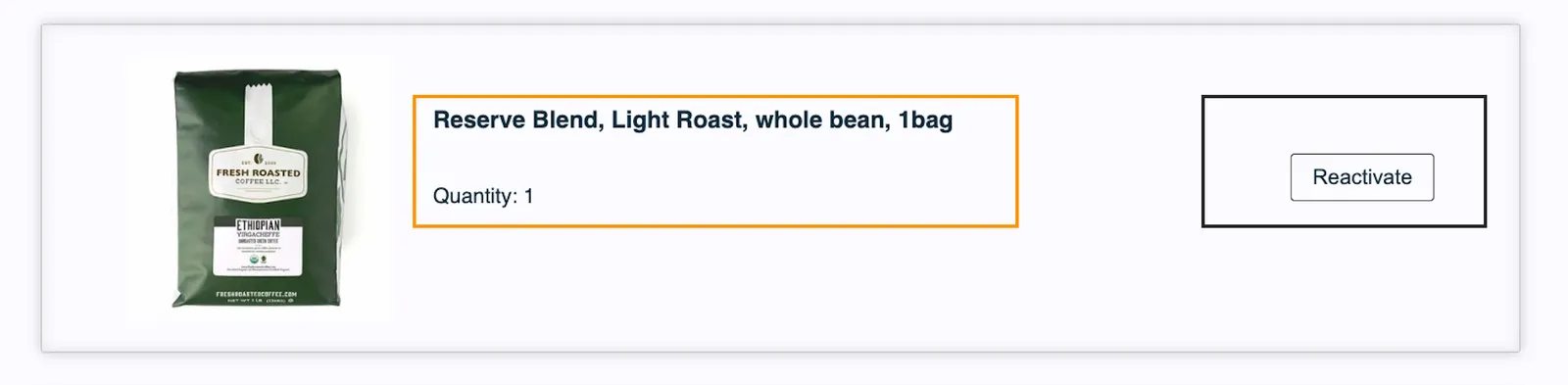
An inactive subscription's product card in the Subscription Manager, with the Controls Container split into two outlined parts. An orange outline marks the Product Description: the product name, Reserve Blend, Light Roast, whole bean, 1bag, and Quantity: 1. A dark outline on the right marks the Reactivate Subscription part, which holds the Reactivate button.

Product Description — Name & Quantity

<div class="og-description-and-controls">
<div class="og-product-description">
<h3 class="og-product-name">
<a href="{{ product.detail_url | if_defined }}">{{ product.name }}</a>
</h3>
<div class="og-subscription-quantity">{{ 'product_read_only_quantity' | t }}</div>
</div>
</div>

Reactivate Subscription

<div class="og-inactive-subscription-actions">
{% include 'reactivate-subscription' %}
<div class="og-cancelled-text-date">
<span class="og-cancelled-text">{{ 'subscription_inactive_cancelled_on' | t }}</span>
<span class="og-cancelled-date">{{ subscription.cancelled | date }}</span>
</div>
</div>{# /og-inactive-subscription-actions #}

Reactivate Subscription Modal

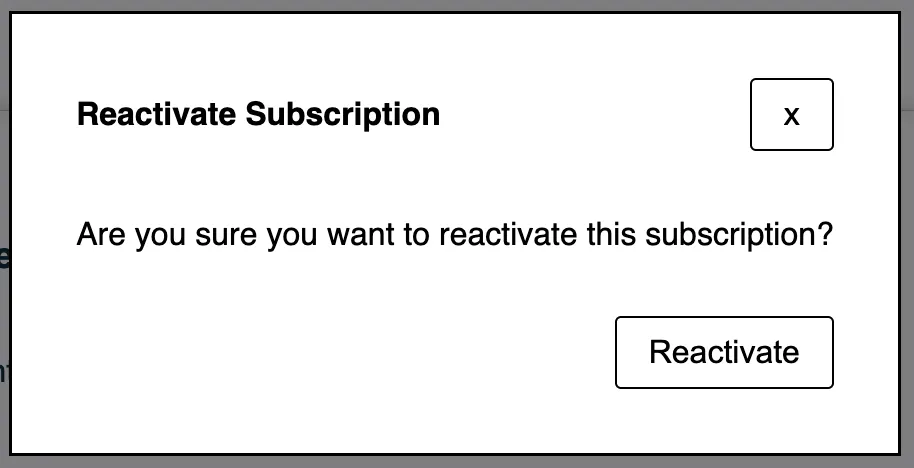
The Reactivate Subscription pop-up modal in the Subscription Manager, shown over the dimmed page and rendered by reactivate-subscription.liquid. It is titled Reactivate Subscription and asks: Are you sure you want to reactivate this subscription? An x close button is at the top right and a Reactivate button at the bottom right.

The code for this modal is found in the reactivate-subscription.liquid file:

<div class="og-reactivate-subscription-button">
<button
class="og-button"
type="button"
@click={{ 'show_closest_modal' | js }}
>
{{ 'subscription_reactivate_button' | t }}
</button>
<dialog aria-hidden="true">
<form
action="{{ 'reactivate_subscription' | action }}"
name="og_subscription_reactivate"
@success={{ 'close_closest_modal' | js }}
@reset={{ 'close_closest_modal' | js }}
>
<div class="og-dialog-header">
<h5 class="og-dialog-title">{{ 'modal_subscription_reactivate_header' | t }}</h5>
<button type="reset" aria-label="{{ 'modal_close' | t }}" class="og-button og-button-close">{{ 'modal_close' | t }}</button>
</div>{# /og-dialog-header #}
<div class="og-dialog-body">
{{ 'modal_subscription_reactivate_body' | t }}
</div>{# /og-dialog-body #}
<div class="og-dialog-footer">
<input type="hidden" name="subscription" value="{{ subscription.public_id }}"/>
<input type="hidden" name="every" value="{{ subscription.every }}"/>
<input type="hidden" name="every_period" value="{{ subscription.every_period }}"/>
<button name="reactivate_subscription" type="submit" class="og-button">
{{ 'modal_reactivate_save' | t }}
</button>
</div>{# /og-dialog-footer #}
</form>
</dialog>
</div>{# /og-reactivate-subscription-button #}