

Bundle Subscriptions
Our bundle suite provides an innovative approach to subscription management, allowing customers to oversee a single subscription with multiple items. Customers can customize their bundle by selecting which items they want, offering flexibility and a streamlined order management process.
New Bundles Capabilities
Ordergroove’s legacy bundles are represented by a single line item for the entire bundle, whereas the new bundles model allows for multiple line items to be linked to the same subscription.
Here’s how orders are represented in legacy bundles vs. the new bundles:
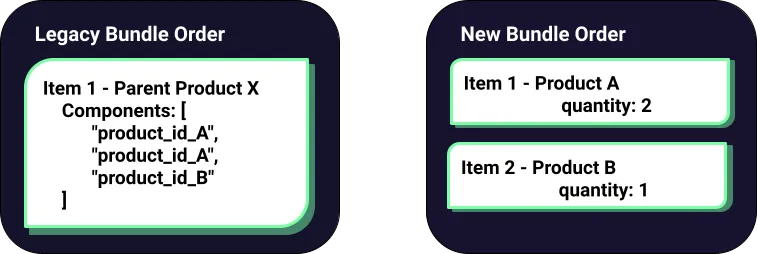
Legacy bundles have item components in their single item while new bundles have multiple items linked to the subscription component. Both use subscription components.
New Bundles Model
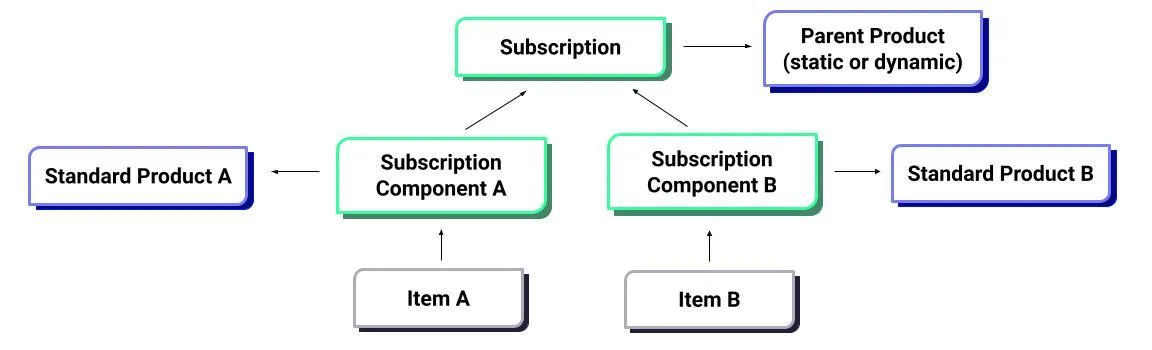
Each subscription includes linked subscription components that dictate the creation of bundle items. These bundle items are standard SKU products delivered to customers, while the subscription itself is governed by a “bundle parent product” that defines the bundle’s behavior.
New Bundles Benefits
- Inventory management is more precise, as each item’s specific SKU and quantity are accurately deducted from stock
- Flex incentives can apply to each item
- Orders are more straightforward to manage, as items will be changed rather than components — this gives the ability to change an item only for the current order
- Customers can edit their orders more intuitively
- APIs have direct control over components
- The initial checkout order is the same as any regular checkout order, facilitating fulfillment
- Offers two different types of pricing models (dynamic and static)
Dynamic vs Static Price Bundle
Ordergroove offers two types of bundle pricing to accommodate a variety of use cases.
Dynamic Price Bundle
In dynamic bundles, each item retains its standard price. If a customer swaps an item for another of a different value or adjusts quantities, the bundle’s total price changes accordingly, summing up the individual prices of all items.
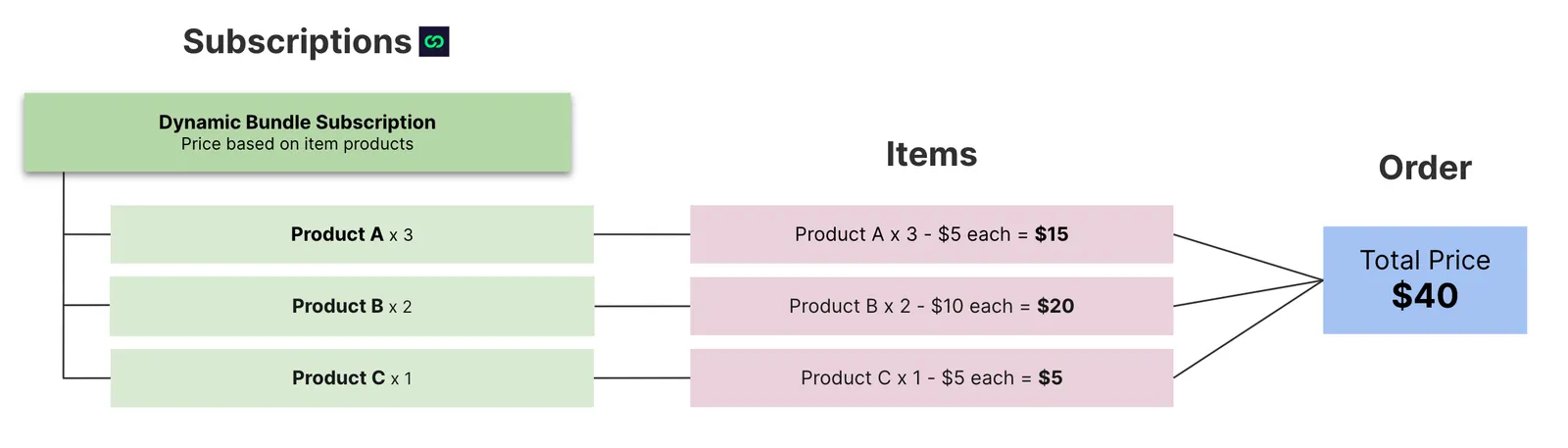
- Dynamic bundle pricing is similar to having multiple subscriptions being shipped together.
- The price of the product set in the item will always be followed, even when an item is SKU swapped.
- The parent product price must be set to $0 in dynamic bundles.
Static Price Bundle
For static bundles, the total bundle price is determined by the parent product’s price. Individual item prices within the bundle are adjusted in a weighted manner so that the sum equals the parent product’s price, ensuring the bundle’s total price consistently reflects the parent product’s price plus any incentives. The parent product price must be set to a positive value in static bundles.
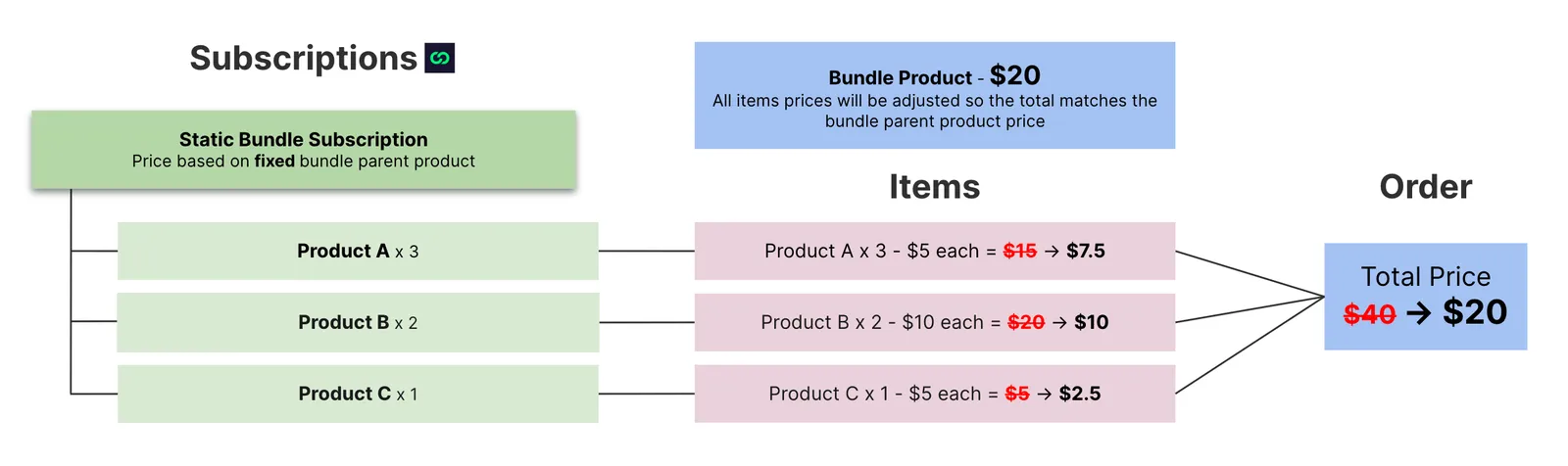
The $20 price of the bundle parent product will be distributed between all items in a weighted manner. Each item’s adjusted price is calculated by:

Here is a price breakdown of each item price calculation:
- Order total before adjustments: $15 + $20 + $5 = $40
- Item 1 original total price: $15 → Adjusted Item Price = ($15 / $40) * $20 = $7.50
- Item 2 original total price: $20 → Adjusted Item Price = ($20 / $40) * $20 = $10.00
- Item 3 original total price: $5 → Adjusted Item Price = ($5 / $40) * $20 = $2.50
Important Considerations for Static Bundles
- Occasionally, in static bundles with incentives, the total may be slightly off by one or two cents. This discrepancy is due to how incentives are applied individually to each item rather than to the entire bundle order. For example, a bundle order costing $10 with 20% off should total $8. As the bundle divides the 20% discount across all items, some may lose a few cents due to weighted pricing — so the total discounted bundle price could be $7.99 instead of $8.
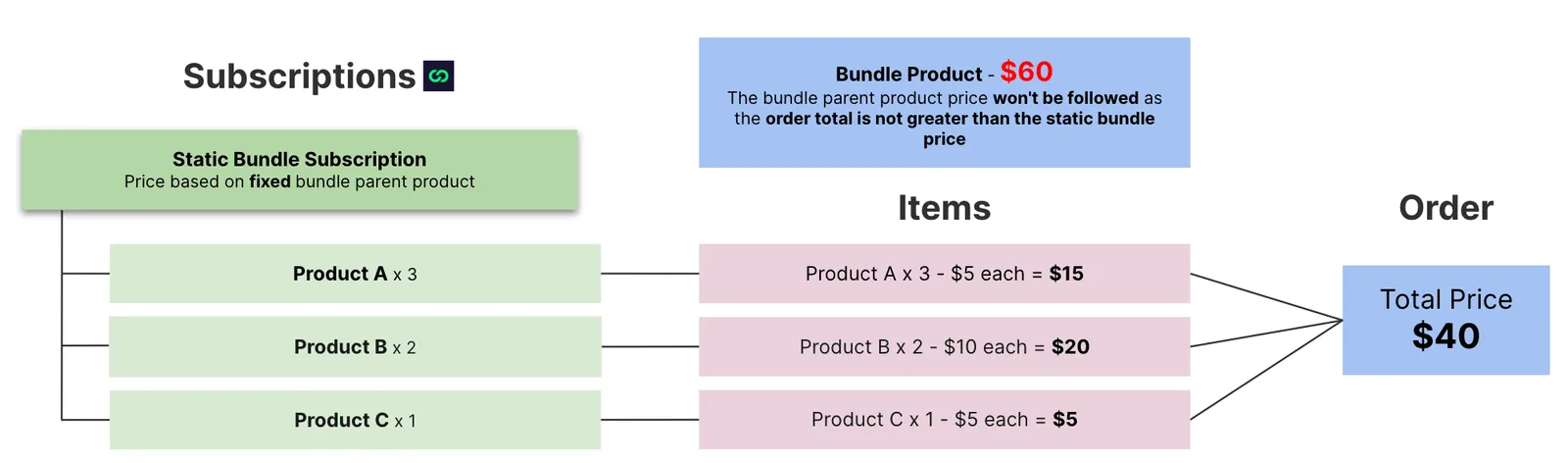
- If the sum of item prices within the bundle is less than the parent product’s price, the pricing will default to dynamic, based on the normal prices of the products rather than the parent product’s price. For example, if the parent product is priced at $60 and the items are priced at $15, $20, and $5 (totaling $40), the order will be calculated at $40, ignoring the parent product price. The sum of item prices must exceed the parent product price to qualify for static bundle pricing. This ensures customers are not overcharged.
Bundle Limitations
Note that certain features are not yet available for the new bundles:
- Shopify Discount Codes
- Prepaid options
- Multi-currency (Shopify Markets) for static bundles